
Southern PinesMPR
Apple TV
Show a laptop, tablet or phone on the MPR projectors.
- Picture only
- Sound can’t be sent to the room speakers this way
- Wi-Fi
- “TVs” · ask the Production team for the password
- Connect to
- The Apple TV named “MP Room”
Connect
- Turn on the Apple TV
Use the silver Apple TV remote.
- Join the TVs Wi-Fi
Your device has to be on the “TVs” network. Email the Production team for the password.
- Mirror your screen
Use your device’s screen mirroring or wireless display and pick “MP Room.”
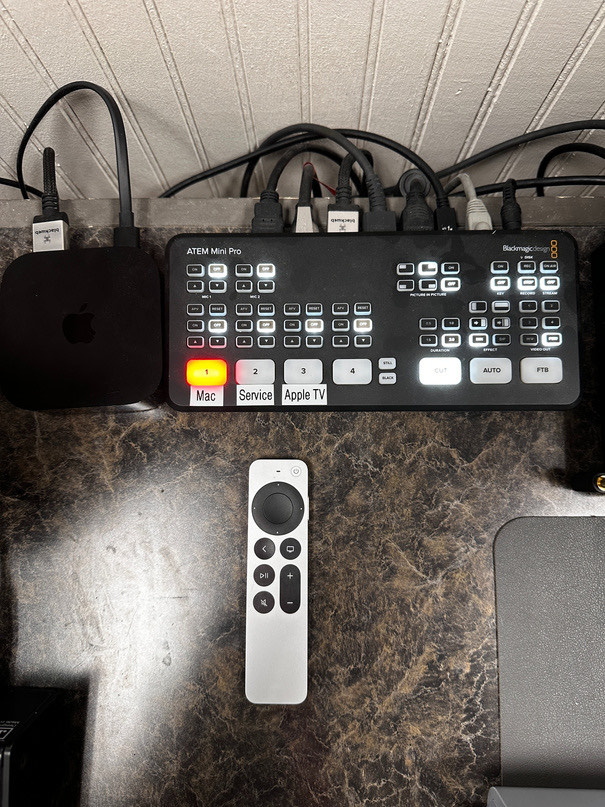
- Press Apple TV on the ATEM Mini
The Blackmagic ATEM Mini sits next to the Apple TV. Its Apple TV button puts your device on the screens.
When You’re Done
- Press Mac on the ATEM Mini
Mac is the ProPresenter computer. Switching back leaves the screens ready for the next gathering.
“And whatever you do, in word or deed, do everything in the name of the Lord Jesus, giving thanks to God the Father through him.”Colossians 3:17 ESV
Something not working?
Email the Production team and tell us what you see.